Valid study plans, every time.
StudyPlanner is an AI-powered MSc study planner that validates student plans against your programme rules in real time — so coordinators stop spending hours fixing invalid plans over email.
Live demo available · Multi-tenant · Branded per institution · GDPR-compliant
Coordinators shouldn't be a human plan validator.
Hundreds of emails per term
Students send half-built plans asking what counts and what doesn't. The same questions, every quarter.
Invalid plans surface late
EC totals, prerequisite chains, and PPD credits often only get checked when it's too late to swap a course.
No view across the cohort
Each plan lives in a PDF or Excel sheet on a student's laptop. No data, no patterns, no way to improve the programme.
~2 hrs
saved per student per year
coordinator time on plan validation
< 2 weeks
to go live
typical programme onboarding time
0
invalid plans
target state after deployment
Based on TU Delft Aerospace Engineering pilot · estimates subject to programme complexity
How it works
From blank page to validated plan in under ten minutes.
Pick your programme & track
The student selects their MSc programme and specialisation. Mandatory courses pre-load instantly from your validated catalogue.
AI suggests electives
An AI model analyses the student profile against the full course catalogue and surfaces electives that fit their track, interests, and remaining EC budget.
Real-time validation
Every change is validated live — EC totals, prerequisite chains, PPD requirements, and scheduling conflicts flagged before they become a problem.
Share with your advisor
One link generates a shareable read-only plan. No login, no PDF export, no back-and-forth email.
What's included
Everything a student needs to build a valid plan. Everything a coordinator needs to stop reviewing them manually.
Guided setup
Programme, track, and sub-track selection pre-loads the right mandatory courses automatically.
AI course recommendations
Personalised elective suggestions based on the student's profile and the full course catalogue.
Real-time EC validation
Live credit totals with instant flags for shortfalls, overloads, and prerequisite violations.
A/B plan comparison
Students can build and compare two plan variants side-by-side before committing.
Advisor share links
One shareable URL per plan — no account needed for the advisor to view or comment.
Multi-university ready
Each institution gets its own branded subdomain, catalogue, and rules. No shared state.
For universities
StudyPlanner is built to be deployed across programmes and institutions, not just one. If you coordinate an MSc and want fewer plan-validation emails next term, let's talk.
Book a 20-min demoData & Privacy
Student plans are stored locally in the browser by default. No data leaves the student's machine unless they choose to share. If shared, data is stored on EU infrastructure and never used for training or shared with third parties. GDPR-compliant by design.
Multi-tenant from day one
Each university gets its own catalogue, rules, branding, and subdomain. Ready to deploy for your programme.
Zero onboarding cost for students
No account required to plan. Students land, build, validate, share — all without IT involvement on your side.
Programme analytics for coordinators
See aggregate elective demand, common invalid configurations, and where students get stuck — anonymised, opt-in.
We handle the rules
Send us your programme guide; we encode the validation logic and keep it up to date each academic year.
Case study · TU Delft
From email chaos to self-service validation
MSc Aerospace Engineering students at TU Delft now validate their own study plans before advising appointments. StudyPlanner encoded 180+ courses across 5 specialisation tracks — including prerequisite chains, EC requirements, and PPD credits — in under two weeks.
180+
courses encoded
5
specialisation tracks
< 2 wks
setup to live
Branded per institution
Students land on a programme-specific page. The planner loads the right catalogue, tracks, and rules automatically — no configuration needed on the student side.

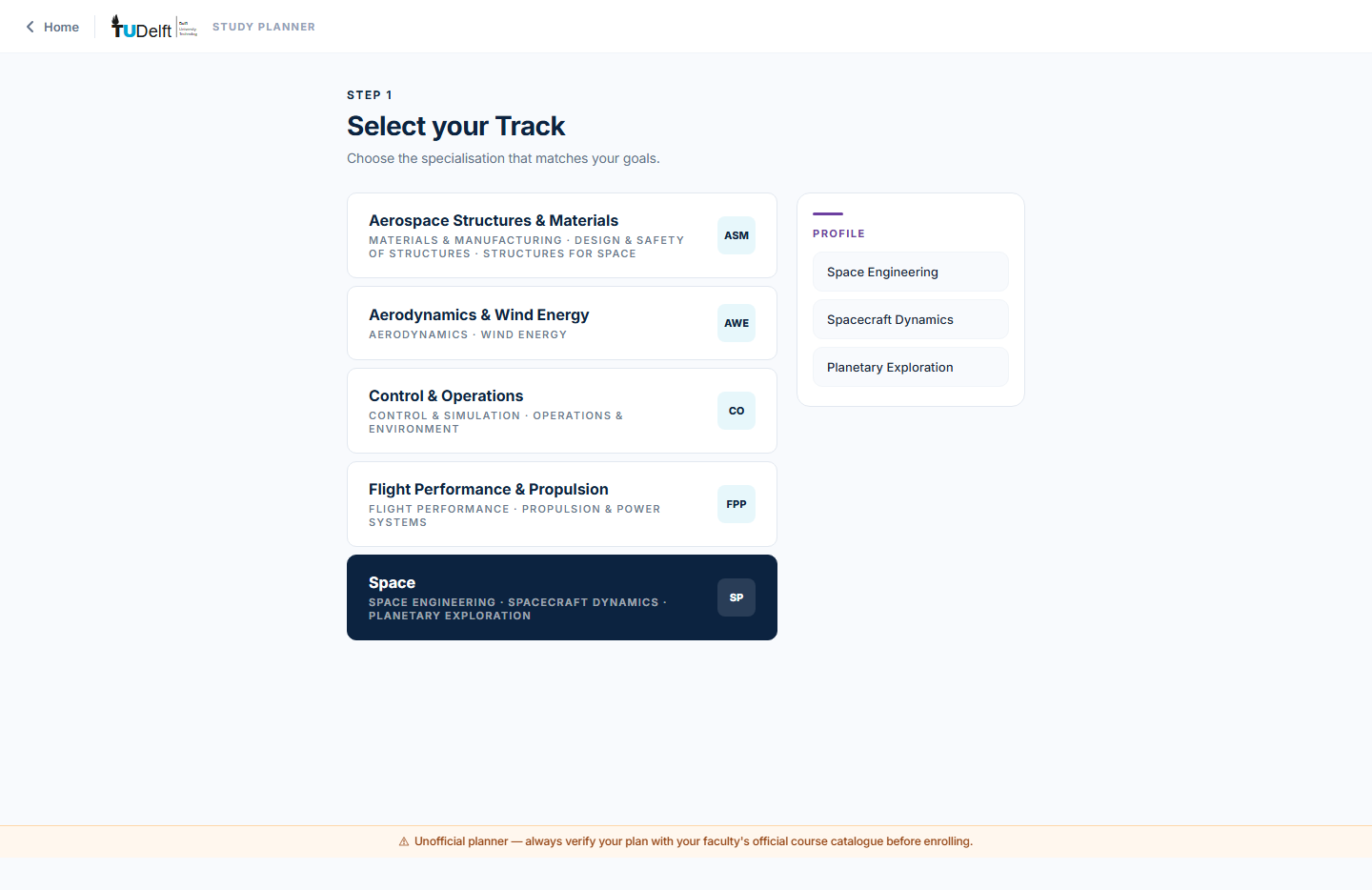
Pick track and profile
Step 1: the student picks their specialisation. Mandatory courses pre-load instantly. The profile panel on the right shows sub-tracks to narrow elective recommendations.
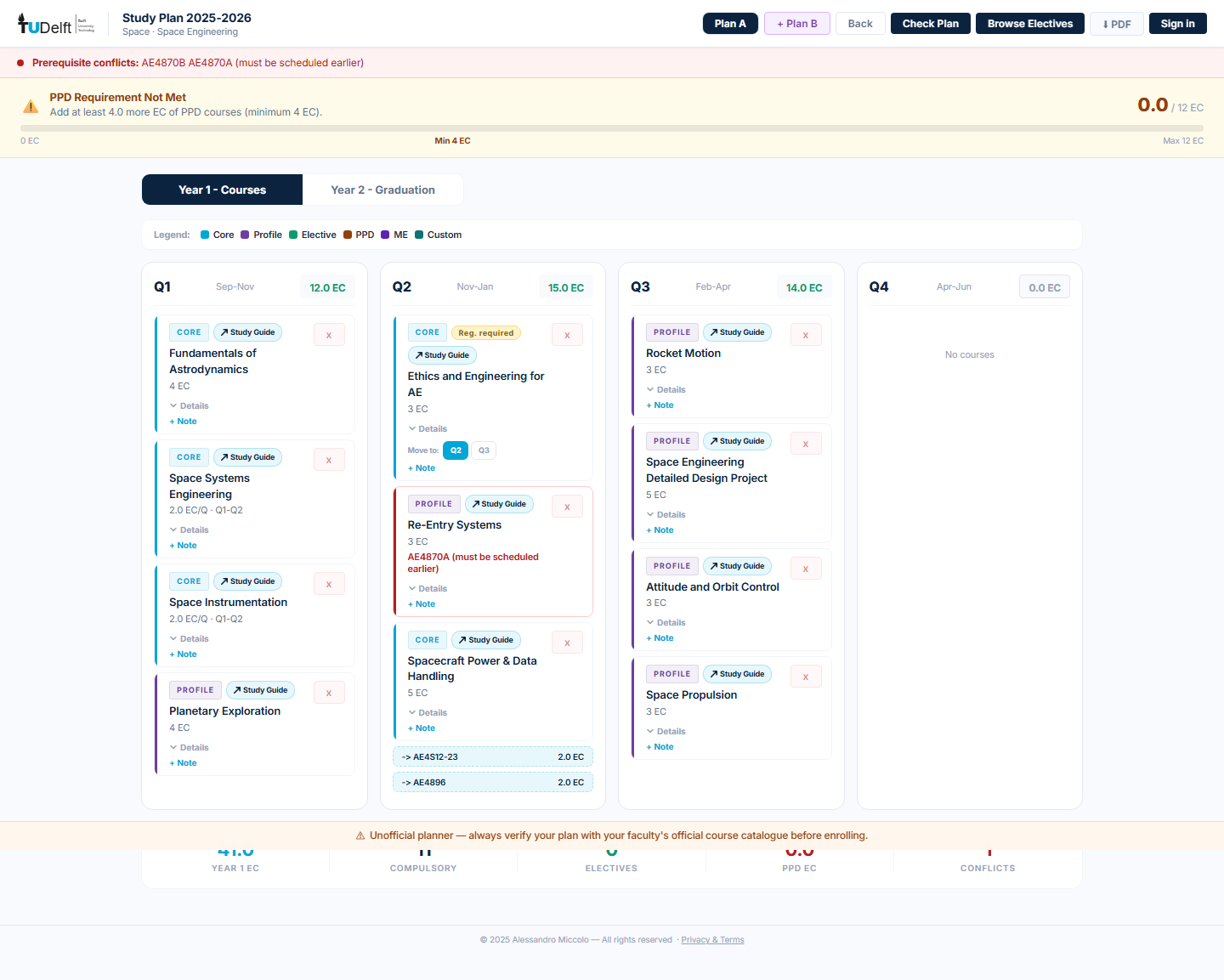
Full plan — live validation + AI
The plan view: four quarters per year, real-time EC totals, prerequisite conflict flags, workload indicators, and an AI recommendation panel that analyses the student's profile against the full catalogue.
Common questions
How long does it take to set up for my programme?
What does it cost?
Is student data safe and GDPR-compliant?
Does it connect to our student information system?
What if our programme rules change each year?
Can students use it without creating an account?
Bring StudyPlanner to your university.
Twenty-minute call. We'll walk through the demo, show how the multi-tenant setup works, and scope what it would take for your programme.